Local-first voice cloning, text-to-speech, PDF reader, and audiobook creator.
Now with agentic MCP support for Codex and Claude Code. Optimized for Apple Silicon with native Metal acceleration via MLX and ONNX runtimes for multilingual TTS.
Listen to complete chapters generated locally on Apple Silicon. Qwen3 Clone delivers studio-quality narration from your custom voice prompts.
🎧Qwen3-TTS Voice Clone — Premium Quality
Voice-cloned narration with natural prosody and emotional depth. "A Scandal in Bohemia" from Conan Doyle's Sherlock Holmes (public domain). Each audiobook is ~43 minutes of continuous speech generated entirely on-device.
Yelena
Sherlock Holmes · 43m 20s
Qwen3 ClonePremiumFemale1.0x Speed
"A Scandal in Bohemia" with Yelena's cloned voice. Full 20-page chapter with natural pacing and expression.
Qwen3
0:00
Mikhail
Sherlock Holmes · 45m 36s
Qwen3 ClonePremiumMale1.0x Speed
"A Scandal in Bohemia" with Mikhail's cloned voice. Holmes and Watson with expressive male narration.
Qwen3
0:00
Anastasia
Sherlock Holmes · 43m 40s
Qwen3 ClonePremiumFemale1.0x Speed
"A Scandal in Bohemia" with Anastasia's cloned voice. Elegant narration with refined vocal character.
Qwen3
0:00
Svetlana
Sherlock Holmes · 43m 55s
Qwen3 ClonePremiumFemale1.0x Speed
"A Scandal in Bohemia" with Svetlana's cloned voice. Warm narration with distinctive timbre.
Qwen3
0:00
📖 Kokoro TTS — Fast Generation
Built-in voices with quick generation. Marcus Aurelius' "Meditations" (public domain). Ideal for rapid prototyping and shorter texts.
Emma
British Female · 12m 28s
KokoroFastBritish RP0.95x Speed
"Meditations" with Emma's crisp British accent. Good for quick audiobook drafts.
Kokoro
0:00
George
British Male · 13m 36s
KokoroFastBritish RP0.95x Speed
"Meditations" with George's grounded tone. Suitable for essay-length exports.
Kokoro
0:00
🎧 Qwen3 Voice Clone Language Showcase
Genesis 1:1 generated with shipped Mimika voices across every supported Qwen3 clone language, including Korean with Eleanor.
In the beginning God created the heaven and the earth.
Qwen3-TTS
0:00
Chinese
Voice: Anastasia
Qwen3-TTSGenesis 1:1Voice Clone
起初,神创造天地。
Qwen3-TTS
0:00
Japanese
Voice: Beatrice
Qwen3-TTSGenesis 1:1Voice Clone
初めに、神は天と地を創造された。
Qwen3-TTS
0:00
Korean
Voice: Eleanor
Qwen3-TTSGenesis 1:1Voice Clone
태초에 하나님이 천지를 창조하시니라.
Qwen3-TTS
0:00
German
Voice: Harriet
Qwen3-TTSGenesis 1:1Voice Clone
Am Anfang schuf Gott Himmel und Erde.
Qwen3-TTS
0:00
French
Voice: Mikhail
Qwen3-TTSGenesis 1:1Voice Clone
Au commencement, Dieu créa les cieux et la terre.
Qwen3-TTS
0:00
Russian
Voice: Svetlana
Qwen3-TTSGenesis 1:1Voice Clone
В начале сотворил Бог небо и землю.
Qwen3-TTS
0:00
Portuguese
Voice: Yelena
Qwen3-TTSGenesis 1:1Voice Clone
No princípio, Deus criou os céus e a terra.
Qwen3-TTS
0:00
Spanish
Voice: Alistair
Qwen3-TTSGenesis 1:1Voice Clone
En el principio creó Dios los cielos y la tierra.
Qwen3-TTS
0:00
Italian
Voice: Anastasia
Qwen3-TTSGenesis 1:1Voice Clone
Nel principio Dio creò i cieli e la terra.
Qwen3-TTS
0:00
Create studio-quality AI voices locally, with zero cloud dependency
Instant Voice Cloning
Clone any voice from a 3-second sample. Qwen3-TTS learns timbre, pitch, and cadence while style prompts let you control emotion, pace, and tone.
PDF to Audiobook
Turn documents into full audiobooks with chapter markers and natural pacing. Follow along with sentence highlighting, or export hours of polished audio.
Video Voiceovers
Generate narration for YouTube, explainers, and ads. Switch between four TTS engines to find the perfect voice, then fine-tune with style controls.
Privacy-First Processing
Everything runs on your Mac with native Metal acceleration. No cloud uploads, no API limits, no subscriptions. Your voices stay on your device.
Qwen3-TTS Voice Clone
Audio Samples
Hear Mimika in action
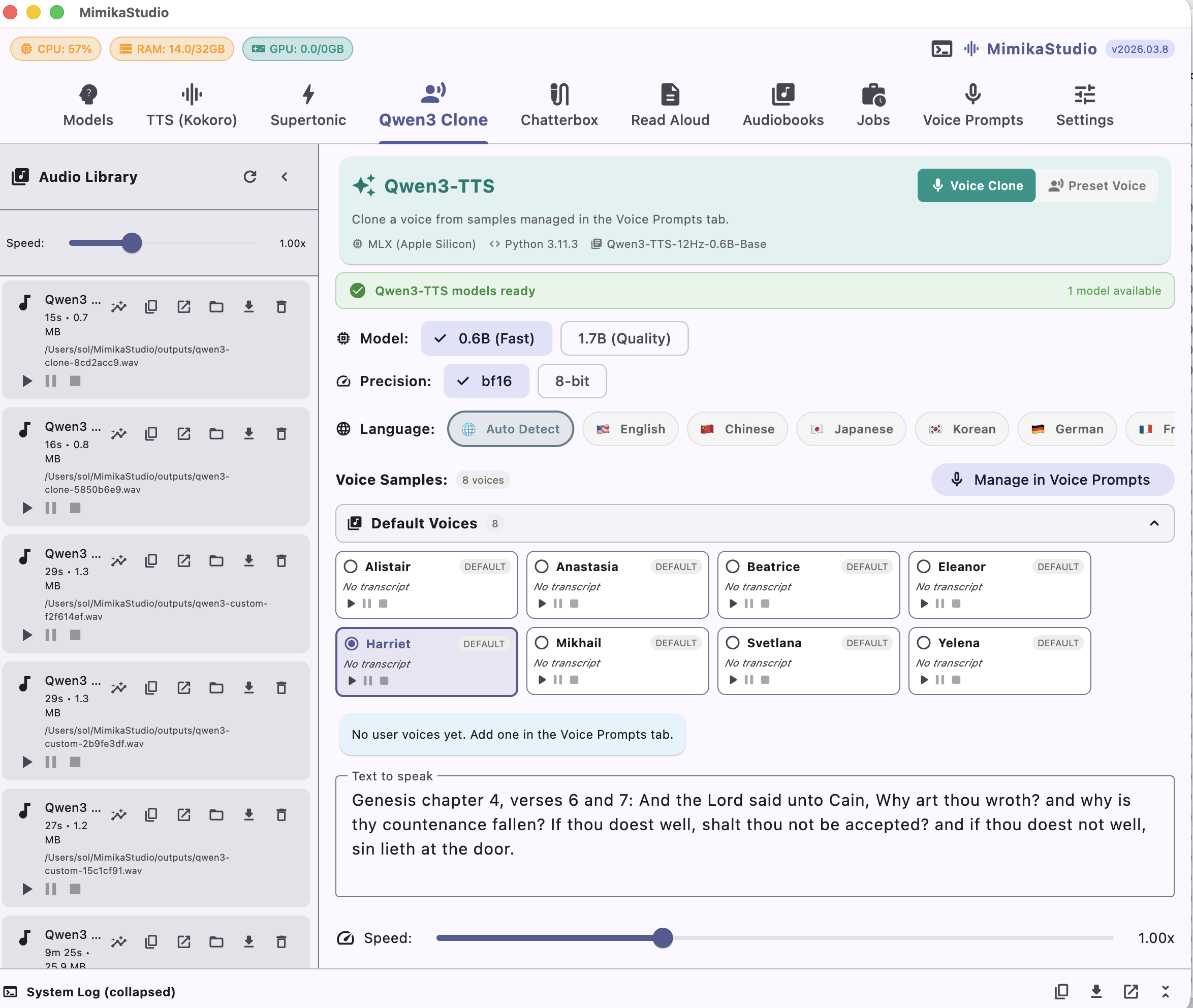
Listen to samples generated by each TTS engine. For voice cloning demos, compare the reference voice with the generated output.
🎧 Qwen3-TTS
Voice cloning from a 3-second sample. Compare the reference voice with the generated output.
Yelena Clone
Genesis4 Style
Qwen3-TTSVoice Clone10 LanguagesStyle Prompt
Generated speech keeps the reference timbre while applying Genesis4 style control.
Reference
Generated
Qwen3-TTS
Svetlana Clone
Genesis4 Style
Qwen3-TTSVoice Clone10 LanguagesStyle Prompt
Reference and generated clips align on pitch contour with a more polished studio-like cadence.
Reference
Generated
Qwen3-TTS
Ryan
Genesis4 Preset Voice
Qwen3-TTSPreset VoiceEnglishLong-form
Preset speaker profile with dependable pronunciation for general narration.
Qwen3-TTS
0:00
Yelena (Hebrew)
Multilingual Demo
Qwen3-TTSVoice CloneHebrewCross-language
Cross-language cloning maps the same vocal identity into multilingual output.
Reference
Generated
Qwen3-TTS
💬 ChatterBox
Expressive voice cloning with emotion control. Natural, emotive speech synthesis.
Yelena Clone
Emotional Speech Demo
ChatterBoxVoice CloneEmotion ControlExpressive
Generated output adds emotional dynamics while preserving speaker identity.
Reference
Generated
ChatterBox
Svetlana Clone
Emotional Speech Demo
ChatterBoxVoice CloneEmotion ControlExpressive
Emotion-aware rendering demonstrates richer contour and emphasis with natural prosody shifts.
Reference
Generated
ChatterBox
Supported TTS & Voice Cloning Engines
Kokoro
Qwen3-TTS
Chatterbox
Supertonic
Kokoro
Qwen3-TTS
Chatterbox
Supertonic
Kokoro
Qwen3-TTS
Chatterbox
Supertonic
Kokoro
Qwen3-TTS
Chatterbox
Supertonic
TTS Engines
Four engines, one studio
Each engine brings unique strengths. Use the right one for your task, or combine them for maximum flexibility.
⚡
Kokoro TTS
82M parameter model with sub-200ms latency. 21 British and American voices with speed control.
Fast21 voicesLocal
🎧
Qwen3-TTS
Clone any voice from just 3 seconds of audio. 9 premium preset speakers with style instructions.
Voice Clone3s referenceStyles
🌎
Chatterbox
Multilingual voice cloning across 23 languages. Clone voices and speak in any supported language.
23 languagesMultilingual
⚡
Supertonic
ONNX-based multilingual synthesis with low-latency local generation across preset voices and multiple languages.
ONNX RuntimeFastMultilingual
4
TTS Engines
23
Languages
30+
Built-in Voices
60+
API Endpoints
Supported Models
Supported Models
All models below appear in the in-app model manager with independent download and status tracking.
Dedicated ONNX multilingual TTS engine for fast preset-voice synthesis.
ONNX RuntimePreset voices5 languages
🎤 Kokoro
Built-in voices with natural prosody. Reading from the Book of Job.
Emma
Job 6:1-2 · British Female
KokoroLocalEnglishNarration
Balanced pacing and crisp articulation for long-form reading with book-like clarity.
Kokoro
0:00
George
Job 14:7 · British Male
KokoroLocalEnglishNarration
Lower-register delivery with stable rhythm suited for document narration and reports.
Kokoro
0:00
Lily
Job 42:5-6 · British Female
KokoroLocalEnglishNarration
Warm and expressive tone with subtle emphasis on key phrases for natural spoken prose.
Kokoro
0:00
⚡ Supertonic
Fast multilingual ONNX synthesis. Instant playback from bundled pre-generated voices.
F1
Genesis 4 Preview
SupertonicLocalEnglishONNX Runtime
Clear high-register narration tuned for scripture-style reading with quick response time.
Supertonic
0:00
M2
Genesis 4 Preview
SupertonicLocalEnglishScripture
Lower-register biblical narration that keeps a grounded tone while preserving clear verse cadence.
Supertonic
0:00
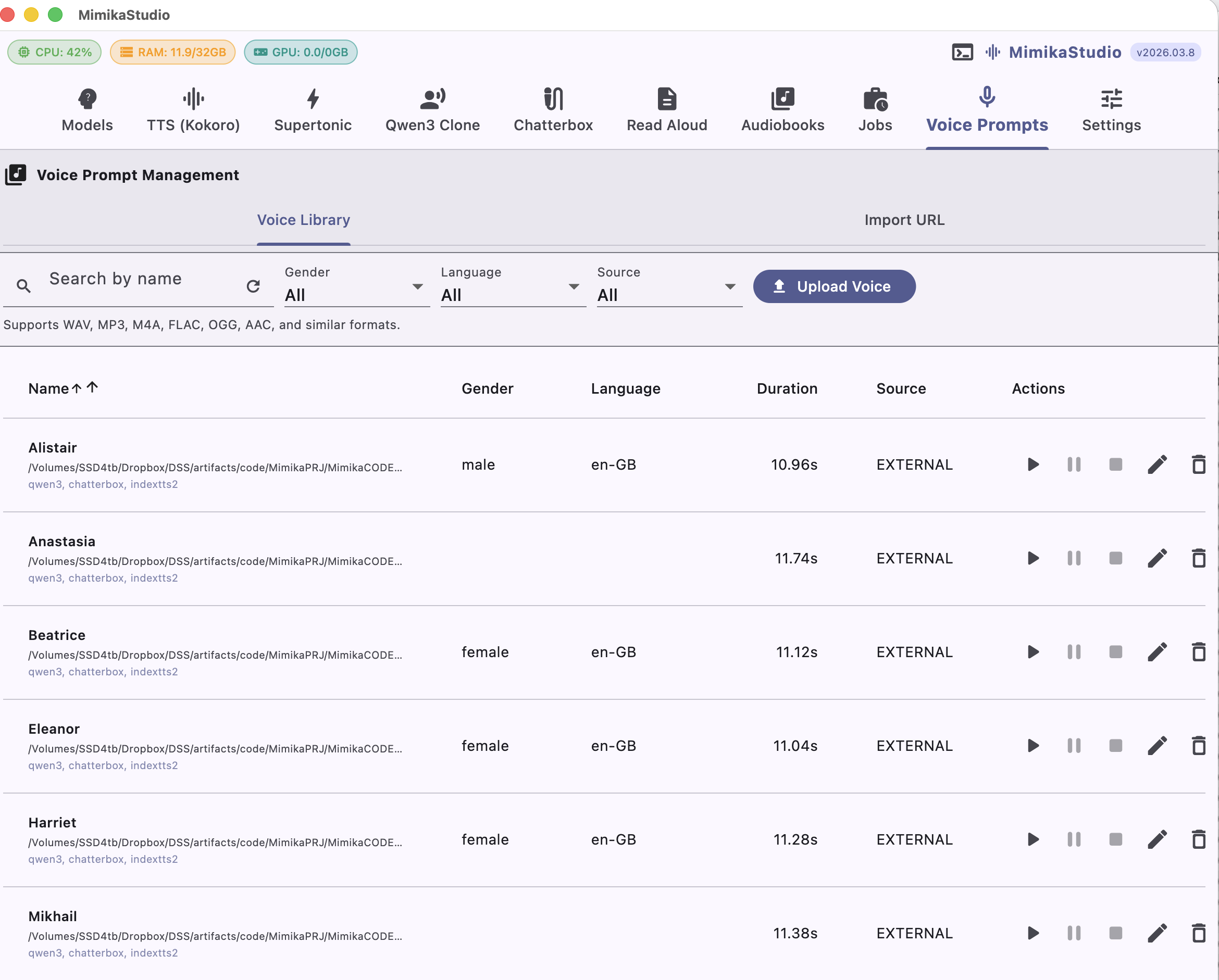
Voice Prompts
Build one shared voice library for every clone engine
The Voice Prompts tab is the staging area for cloning. Upload or import a prompt once, preview it, tag it, and then reuse it across Qwen3 Clone and Chatterbox without duplicating setup.
Shared voice library across clone engines
Search, filter, preview, edit, and delete prompts from one screen
Default voices plus imported external references in the same table
Clone-ready prompts available immediately in generation screens
YouTube Import
Manage uploaded prompts and Import URL flows in one place
The Voice Prompt Management screen keeps the Voice Library and Import URL workflows together. Paste a YouTube URL, choose an optional start time, audition the extracted preview, then save it into the shared voice library with transcript and metadata.
Paste a YouTube URL in the Import URL tab and set an optional start offset
Download a short preview before committing anything to the library
Add transcript, gender, and language metadata when saving
Use the saved prompt for cloning in Qwen3 and Chatterbox
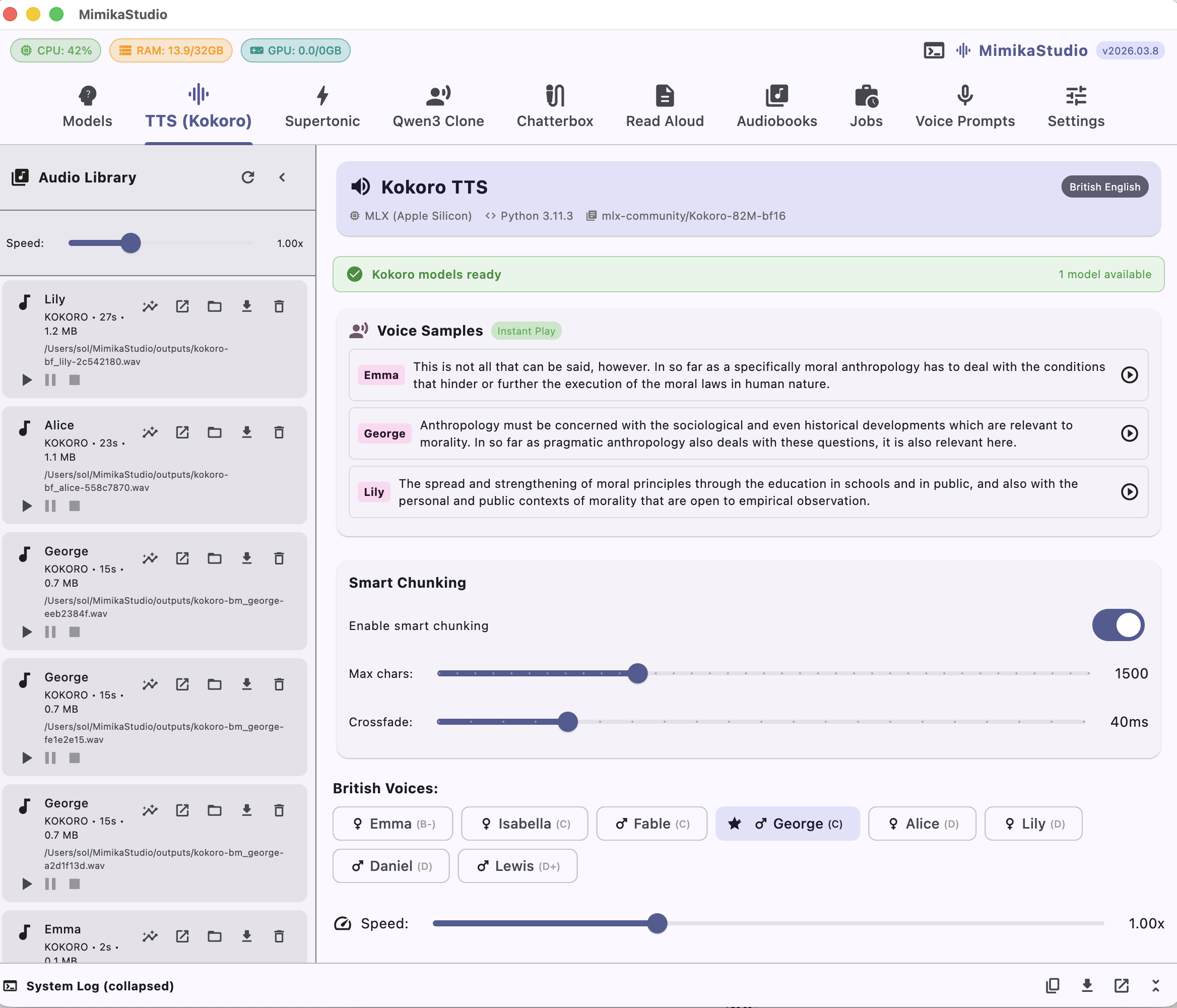
Kokoro TTS
21 British & American voices
The fastest engine in the studio. Generate speech in under 200ms with fine-grained speed control and high naturalness for narration and dialogue.
Sub-200ms generation on MPS and CUDA
British & American voice selection
Adjustable speech speed and style per project
PDF Reader & Audiobooks
Turn PDFs into audiobooks
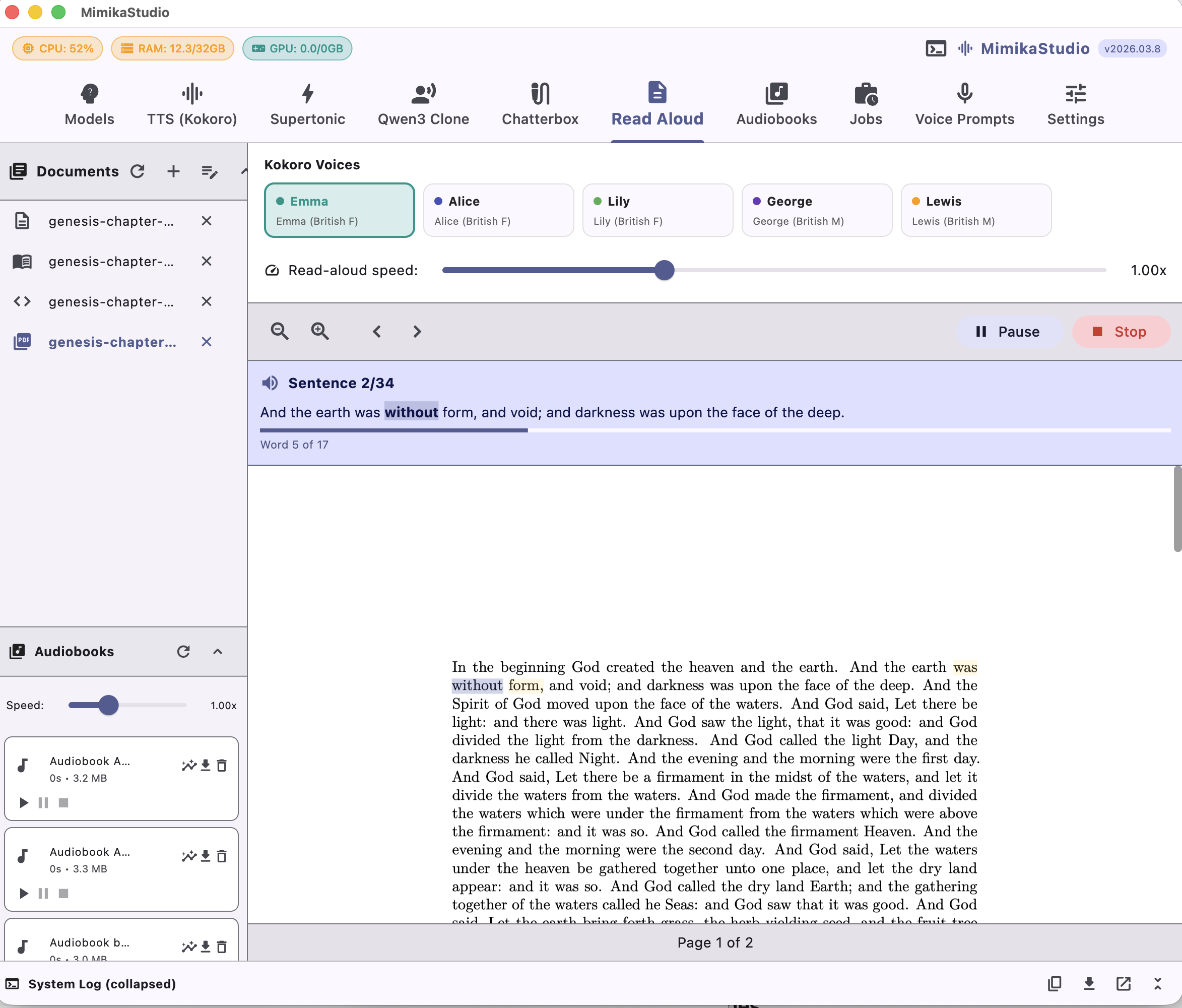
Read PDFs aloud with sentence-by-sentence highlighting, or convert full PDFs into audiobooks with chapter markers. Audiobook generation uses Kokoro voices.
Live sentence highlighting as it reads
Export as WAV, MP3, or M4B with chapters
~60 chars/sec on M2 MacBook Pro
Use any voice, including your cloned voices
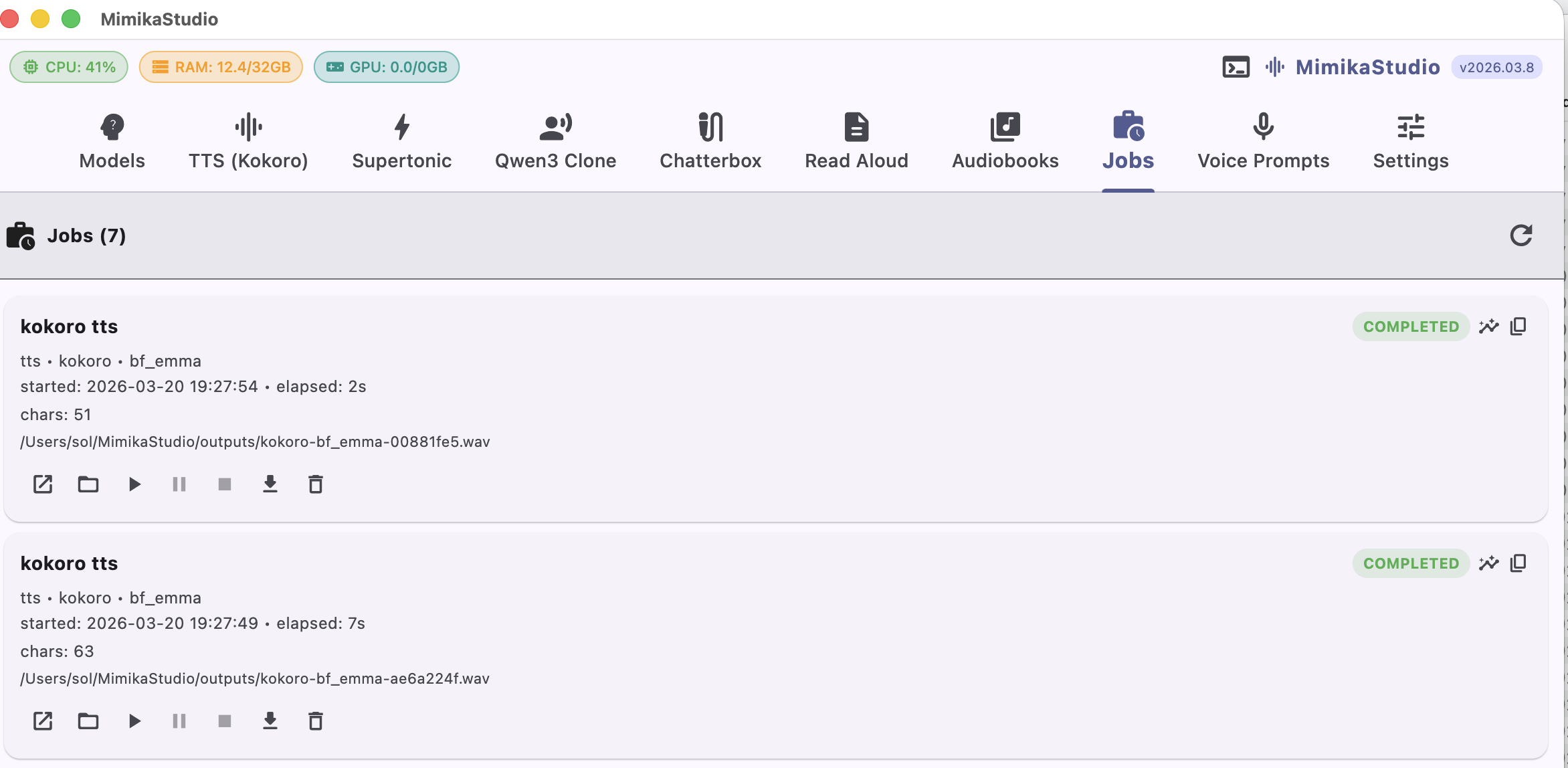
Jobs Queue
Track every generation job in one place
The new Jobs tab shows all executed tasks across TTS, voice cloning, and audiobook exports. Review status instantly and replay outputs directly from the queue.
Unified history for TTS, clone, and audiobook jobs
Completed/in-progress status visibility in one queue
Inline playback controls for generated audio
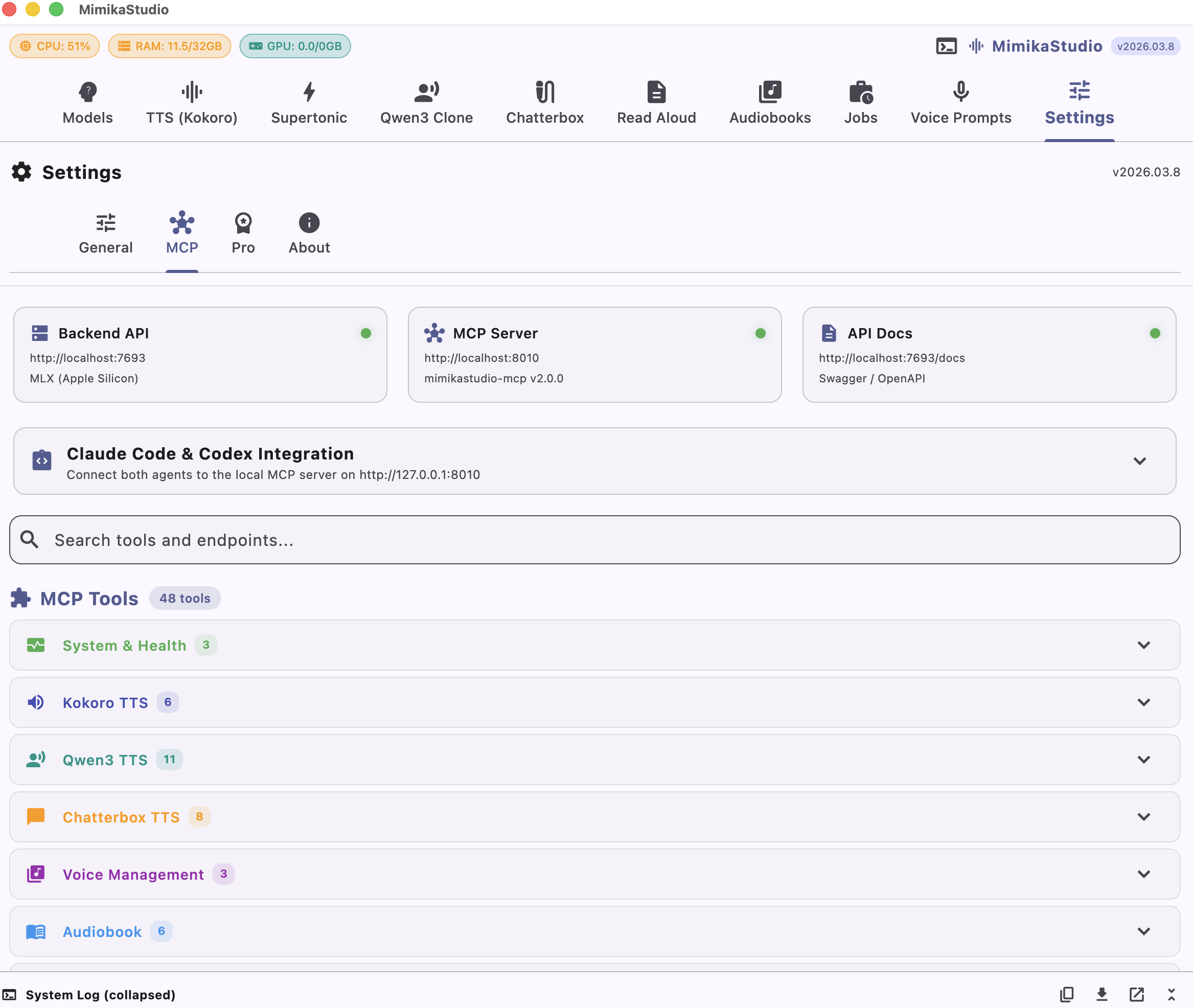
Mimika MCP & API
60+ endpoints. 50+ MCP tools. Full control.
Integrate MimikaStudio into your workflow with a comprehensive REST API and the Mimika MCP (Model Context Protocol) server. The in-app Settings > MCP screen exposes the live tool and endpoint catalog for Claude Code, Codex, scripts, and your own applications.
Full REST API with Swagger docs
Mimika MCP server for Claude Code and Codex
Voice management, audiobook, and TTS endpoints
Example prompts once your client is connected to Mimika MCP at http://127.0.0.1:8010:
Codex:Use Mimika MCP tool audiobook_generate_from_file with file_path=/absolute/path/to/document.pdf, voice=bf_emma, output_format=mp3. Then poll audiobook_status until completed.
Claude Code:Call Mimika MCP audiobook_generate_from_file for /absolute/path/to/document.pdf with voice bf_emma and output_format mp3, then track audiobook_status every 10 seconds.
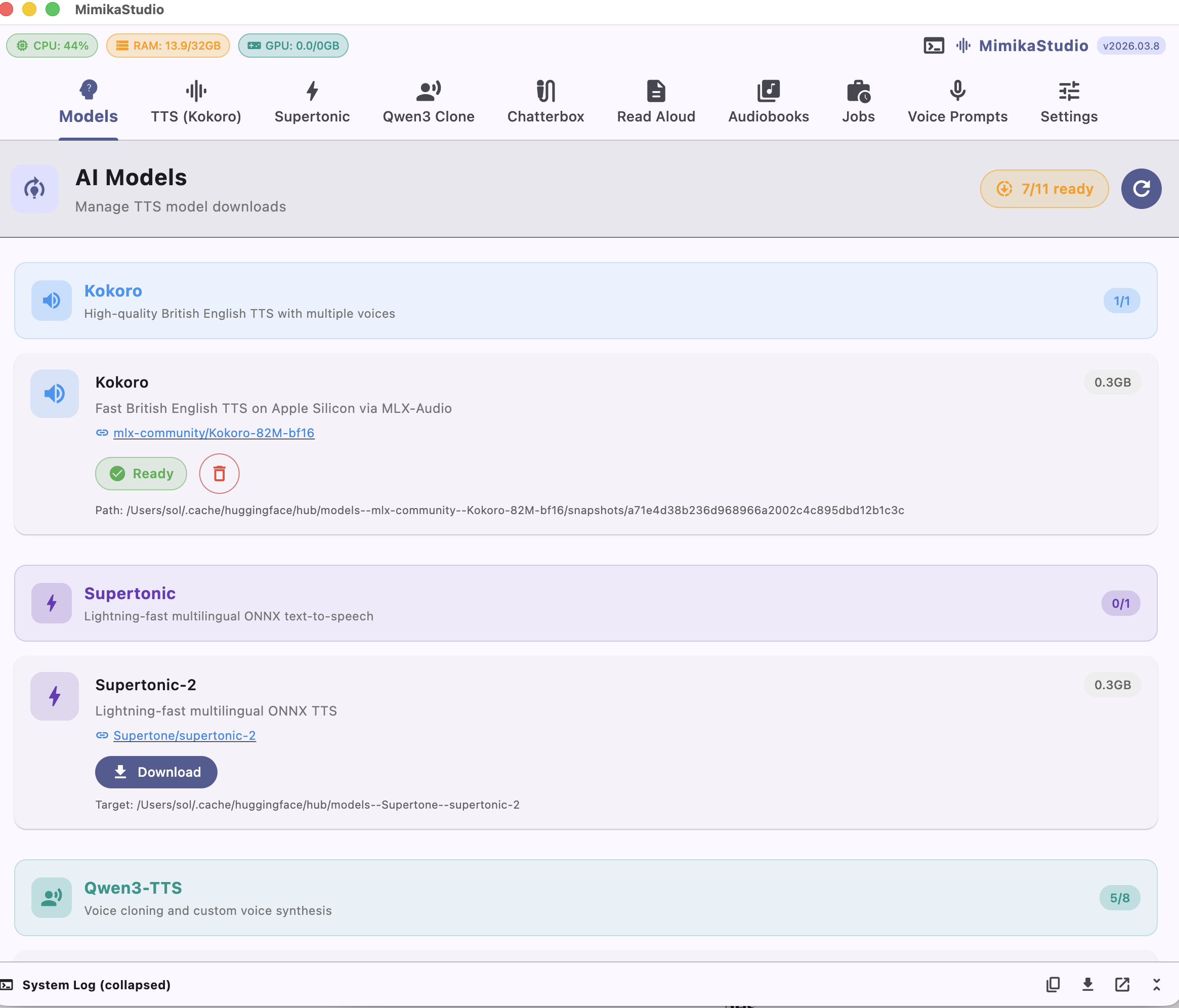
Model Manager
Download models with one click
The built-in model manager lets you download and manage TTS models directly from the app. See model sizes, status, and switch between engines instantly.
One-click model downloads
Automatic model detection & status
Choose model size: 0.6B (fast) or 1.7B (quality)
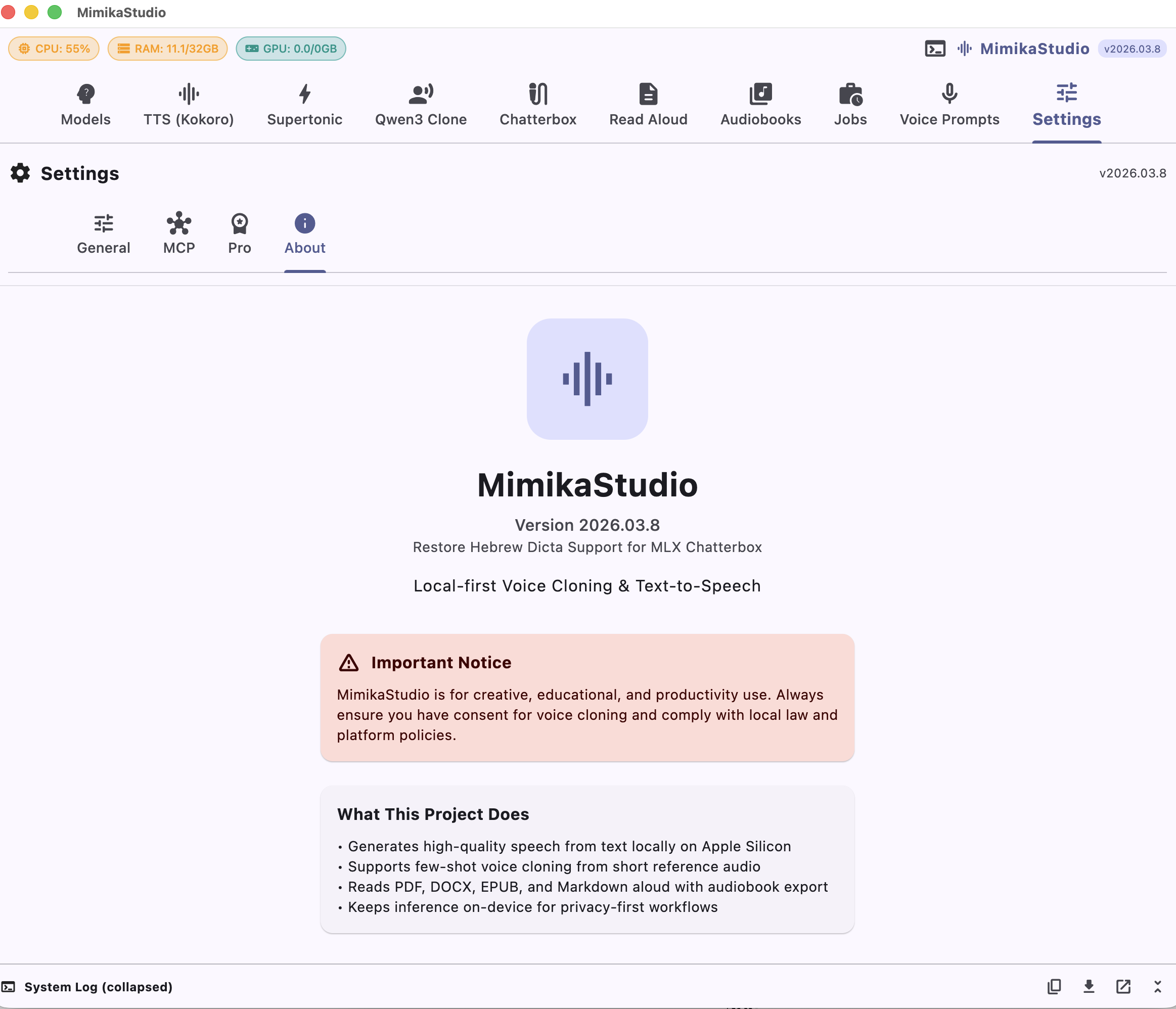
Settings
Customize your workflow
Configure output folders, view app information, and manage your preferences. Everything you need to tailor MimikaStudio to your needs.
Custom output folder configuration
Version info and credits
Links to documentation and support
Languages
Supported languages across Qwen3 and Chatterbox
Qwen3 voice cloning supports 10 languages, and Mimika ships 8 custom-designed reference voices for those demos: Alistair, Anastasia, Beatrice, Eleanor, Harriet, Mikhail, Svetlana, and Yelena. Chatterbox extends multilingual cloning to 23 languages. Hebrew requires the Dicta model, which can be downloaded directly from the app.
🌎 Chatterbox multilingual range
Chatterbox brings multilingual voice cloning across 23 languages. Clone a voice in English and speak in Japanese, Hebrew, or any other supported language.
MimikaStudio runs natively on macOS with MLX-Audio, Apple's machine learning framework. Native Metal acceleration on M1, M2, M3, and M4 chips. Windows support coming soon.
macOS + MLX-Audio
Native Metal acceleration via Apple's MLX framework. Optimized neural inference on M1, M2, M3, and M4 chips.
Windows Coming Soon
The codebase supports Windows with CUDA. Pre-built Windows binaries will be available in a future release.
Flutter Web UI
Access MimikaStudio from any browser. The same Flutter app runs as a web UI backed by the local API server.
Sub-200ms Latency
Kokoro TTS generates speech almost instantly. Real-time performance for interactive use cases.
Local & Private
No cloud, no accounts, no data leaves your machine. All processing happens on-device with local storage.
CLI & MCP Server
Full command-line interface and MCP server for automation. Integrate into Claude Code, Codex, or any workflow.
Start cloning voices today
Runs locally on macOS (Apple Silicon). No account needed. Download directly from GitHub releases. Windows support coming soon.
The codebase is cross-platform, but we currently provide macOS binaries only. License: Source code is licensed under Business Source License 1.1 (BSL-1.1), and binary distributions are licensed under the MimikaStudio Binary Distribution License. See LICENSE, BINARY-LICENSE.txt, and the website License page.
⚠
Alpha Release
This is an early alpha version intended for testing and development. Features may be incomplete, unstable, or change significantly before the stable release. Please report any issues on GitHub.
Unsigned DMG Notice (Apple Gatekeeper)
As of April 1, 2026, the MimikaStudio DMG is not yet signed/notarized by Apple.
If macOS blocks launch, you must remove the quarantine attribute and approve it via Gatekeeper.
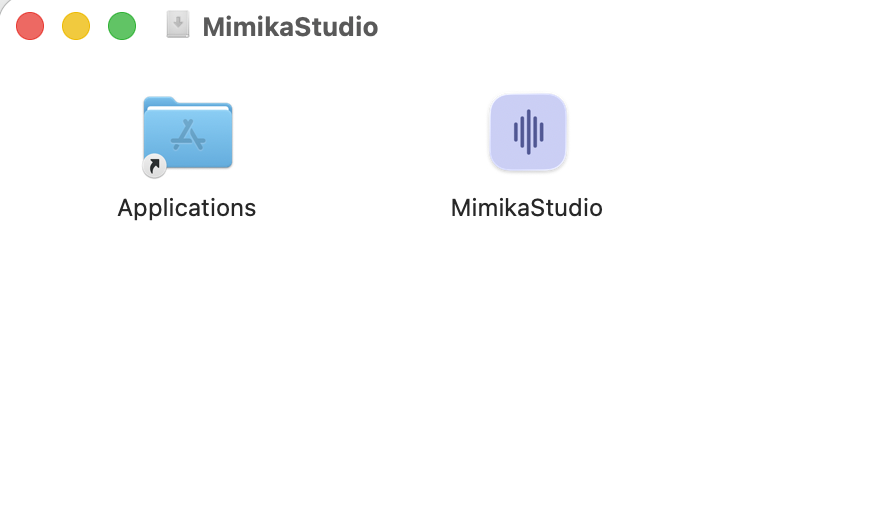
Open the DMG and drag MimikaStudio to /Applications.
Remove the quarantine attribute by running this command in Terminal:
# If installed to /Applications (system-wide):
xattr -d com.apple.quarantine /Applications/MimikaStudio.app

# If installed to ~/Applications (user-only):
xattr -d com.apple.quarantine ~/Applications/MimikaStudio.app
Why? macOS quarantines all downloaded apps. For unsigned apps, Gatekeeper may block execution. This command removes the quarantine flag.
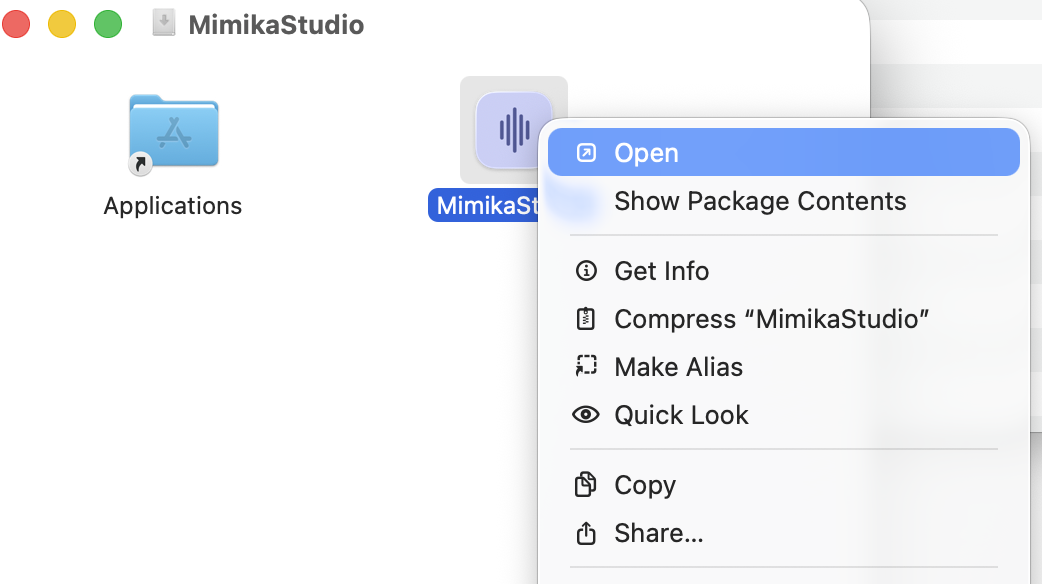
In Applications, right-click MimikaStudio and choose Open.
Click Open again in the warning dialog.
If still blocked, go to System Settings -> Privacy & Security -> Open Anyway for MimikaStudio.
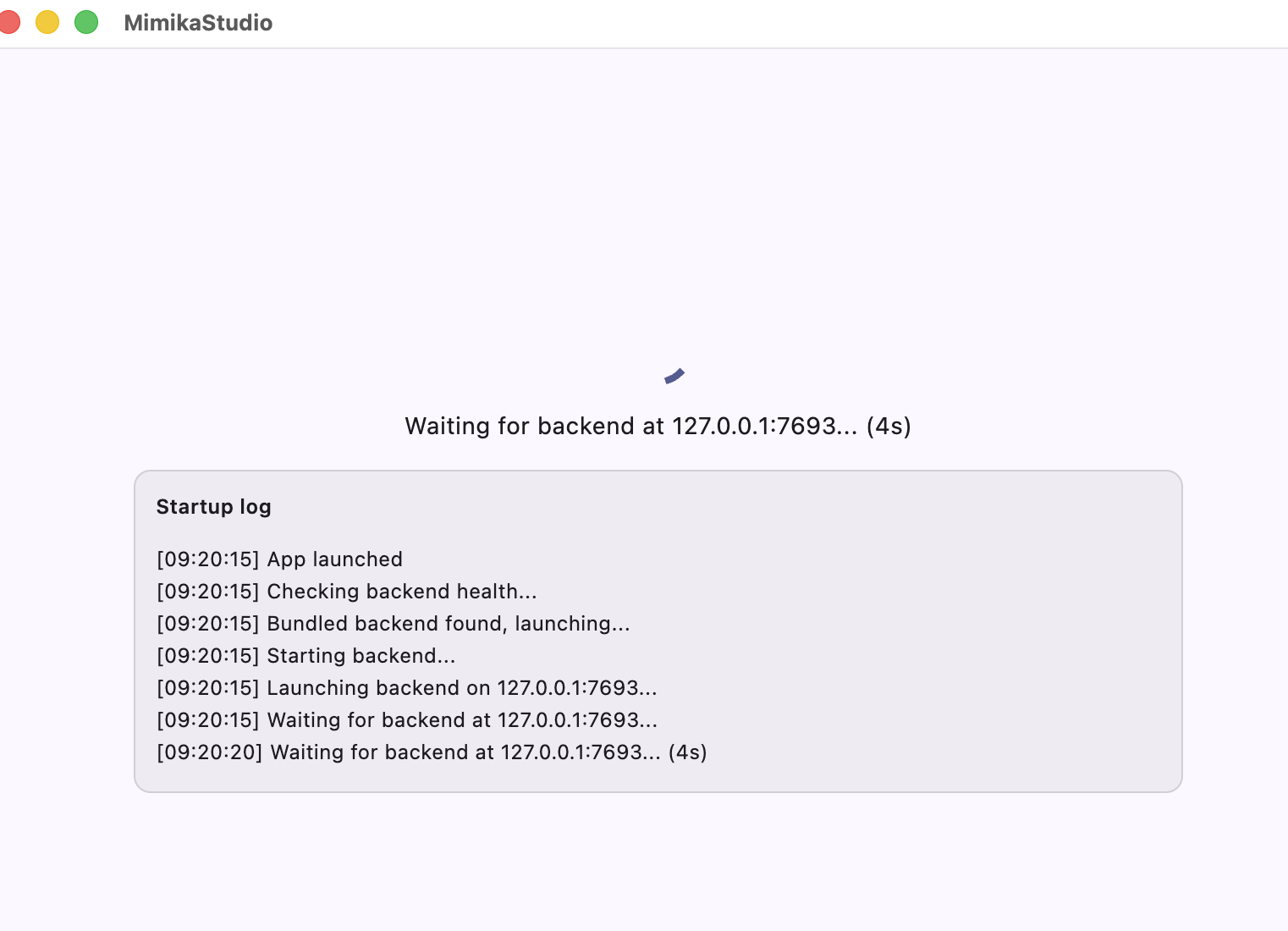
On first launch, wait for backend startup; the startup log screen is expected for a few seconds.
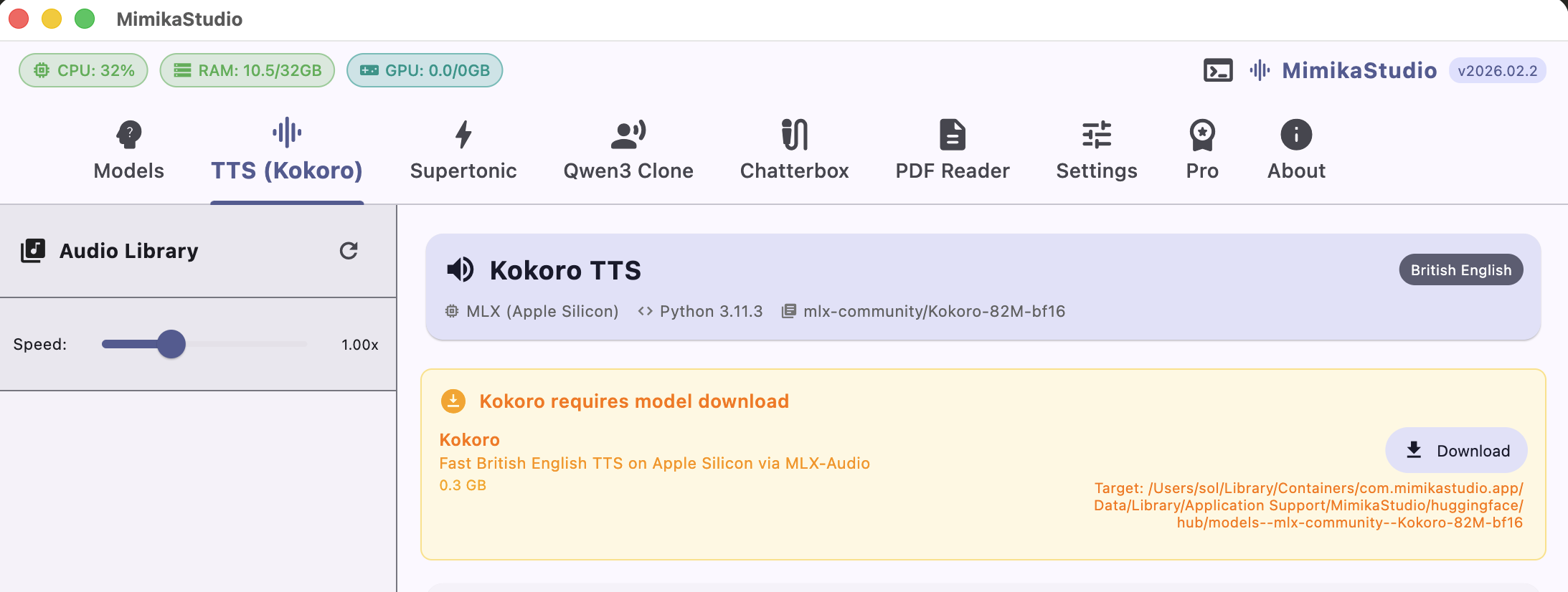
On first use, download the required model from the in-app model card.
Step 1: Open DMG and drag MimikaStudio to Applications.Step 2: Right-click the app and choose Open.First launch: bundled backend startup log while the local server initializes.First use: click Download to fetch the required model before generating audio.